Facility Management System
Commons
A facility management system (FMS) for schools, churches and any organization with many buildings and many groups. Its conflict engine catches what a calendar cannot.
- Spaces modeled as they are used, so booking a court takes the gym and setup time holds the room
- A conflict engine with twelve collision kinds, including two major events on one weekend
- Passwordless portal links for coaches, directors and group leaders, and a request form that needs no login
- QR check-in at the door that records booked against used
- A day sheet sorted by when each room must be ready, flagging setups with nobody rostered
- Utilization, realization and rental income reports, with a print-ready board report
Screens
Select a screen to see it larger.
-
Each request shows what it would collide with, before you decide 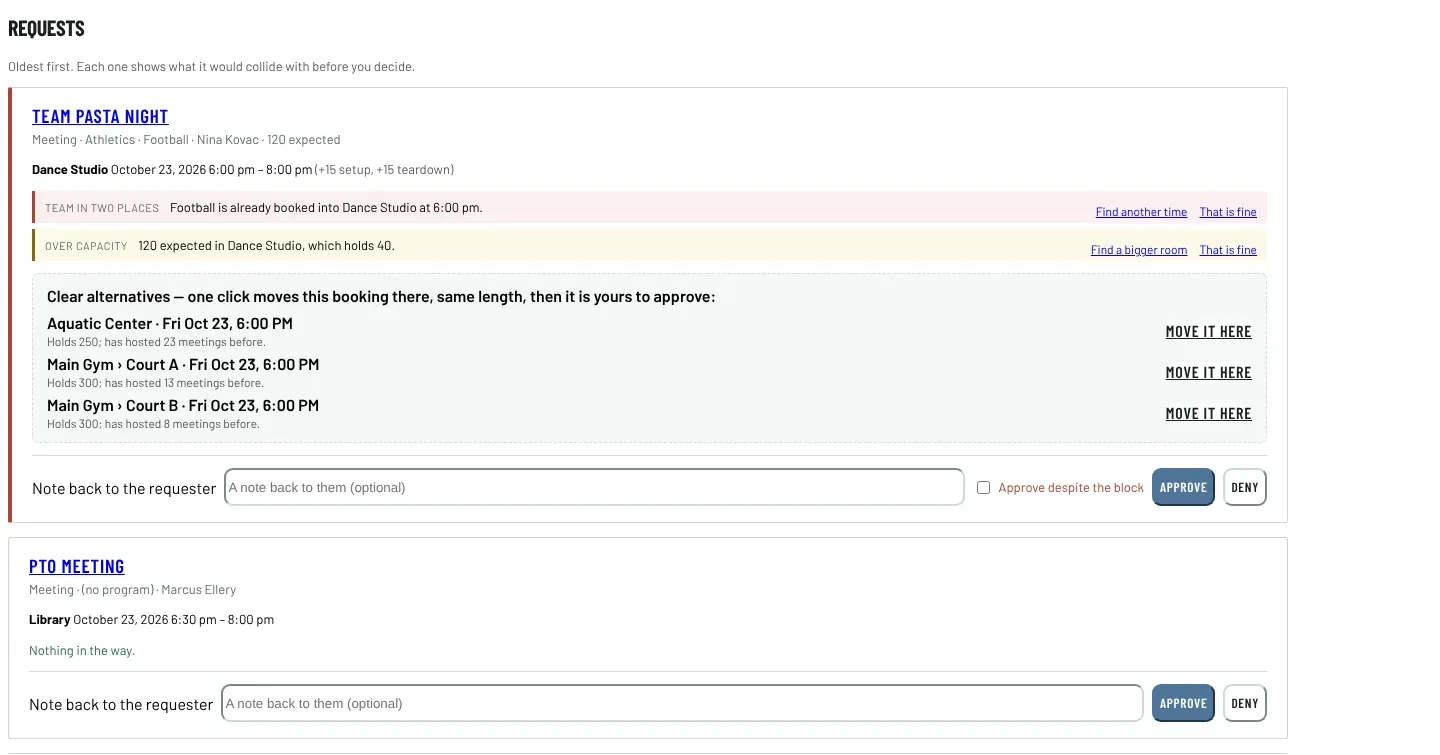
Each request shows what it would collide with, before you decide -
Week by room: rooms down the side, days across 
Week by room: rooms down the side, days across -
Find a space: real gaps, accounting for gyms and courts 
Find a space: real gaps, accounting for gyms and courts -
The day sheet, sorted by when each room must be ready 
The day sheet, sorted by when each room must be ready -
Booked against actually used, and who holds rooms they do not use 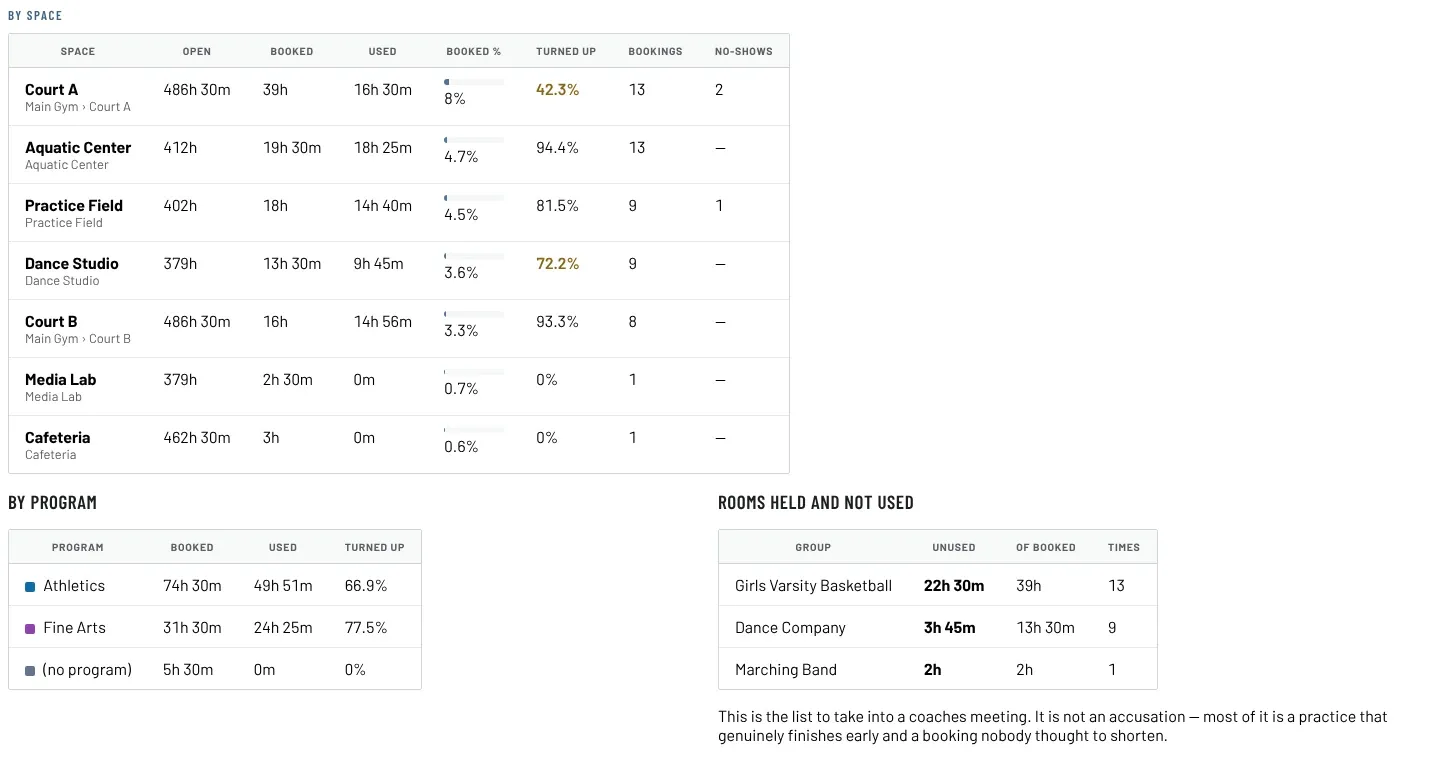
Booked against actually used, and who holds rooms they do not use
Commons is a facility management system (FMS) for any organization with more buildings than it can keep in one person’s head: a school campus, a church with a sanctuary and a fellowship hall, a district, a community center. It schedules every bookable space, from gyms, courts and the auditorium to the sanctuary, classrooms, kitchens and fields. It knows about the games, practices, rehearsals, services, concerts, meetings and outside rentals that compete for them, and it catches the conflicts a calendar cannot see.
Books space properly
A gym divided into two courts is three bookable things, and booking a court takes the gym. A game that runs from seven to a quarter to nine holds the room from half past five to half past nine, because the bleachers have to come out and the floor has to be swept. Both facts are in the model rather than in somebody’s head.
Catches what a calendar misses
Two major events on one weekend never collide on a room. They collide on the same families, the same student body, the same custodians and the same car park. Mark both as major and Commons says so while there is still time to move one. Cancel a booking and exactly the requesters it was blocking hear that the space freed up. Every conflict carries a one-click link to alternatives that keep the same length, buffers and rough time of day.
Records what actually happened
A QR code on the door checks a team in and out. The gap between three hours booked and ninety minutes used is the number that frees up gym time without anybody building a gym, and it is the number a board actually argues with. Utilization meters also tell you when the floor is due for maintenance, counting real wear and excluding no-shows.
Never asks a coach for a password
Coaches, directors and group leaders get a portal link that works without an account. The request form needs no login. A requester sees the whole calendar on purpose: a coach who cannot see that the band has the gym will keep asking for the gym.
WordPress or standalone
Commons runs as a WordPress plugin inside the website an organization already has, or as a standalone application on ordinary PHP and MySQL hosting for organizations without WordPress. Both ship with a sample campus you can load to see the argument before typing anything. The tour, pricing and a demo request are on the Commons website (opens in a new tab).
Accessibility and standards
What Commons is built and checked against, in plain words. These are our own checks, not third-party certifications. About these standards.
- iCalendar feeds
- Standard calendar subscriptions (the iCalendar format, RFC 5545) that work with Apple Calendar, Google Calendar and Outlook.
- Your data in open formats
- Exports come out as CSV, JSON, Markdown, PDF or RSS: files any spreadsheet, text editor or reader can open, with no need for our software.
Questions about Commons
Is Commons only for schools?
No. It began on school campuses and it fits any organization with many buildings and many groups competing for them: churches with a sanctuary, classrooms and a fellowship hall, districts, community centers, camps. The conflict engine does not care what the building is called.
Does Commons need WordPress?
No. Commons runs as a WordPress plugin inside a site you already have, or as a standalone application on ordinary PHP and MySQL hosting. The screens are the same in both.
How is this different from a shared calendar?
A calendar sees two events in two rooms as no conflict. Commons knows that booking a court takes the gym, that a game holds the room for setup and teardown, and that two major events on one weekend collide on the same families, students and custodians. It says so while there is still time to move one, and offers alternatives that keep the same length and time of day.
Do coaches need a login?
No. Coaches, directors and group leaders get a portal link that works without an account, and the public request form needs no login. Only schedulers and administrators sign in.