Volunteer Management System
Headwaters
A volunteer management system (VMS) for nonprofits and community organizations. People, hours, events and reporting that holds up in a grant application.
- One record per person, however many times they show up; hours and consents follow the person
- Passwordless signup through a signed personal link that also handles check-in and hour logging
- A coordinator link that runs the day from a phone in a parking lot, with no account and no signal
- Safety reports with one-tap emergency, location and an audit trail that is never edited
- An hour ledger with the source of every entry, approval, and the volunteer-time value frozen on its date
- CSV import and export, Mailchimp sync, QR codes without a third party, and a 501(c)(3) privacy policy
Screens
Select a screen to see it larger.
-
The dashboard, with today's event one tap away 
The dashboard, with today's event one tap away -
An event's roster, crews and check-in in one place 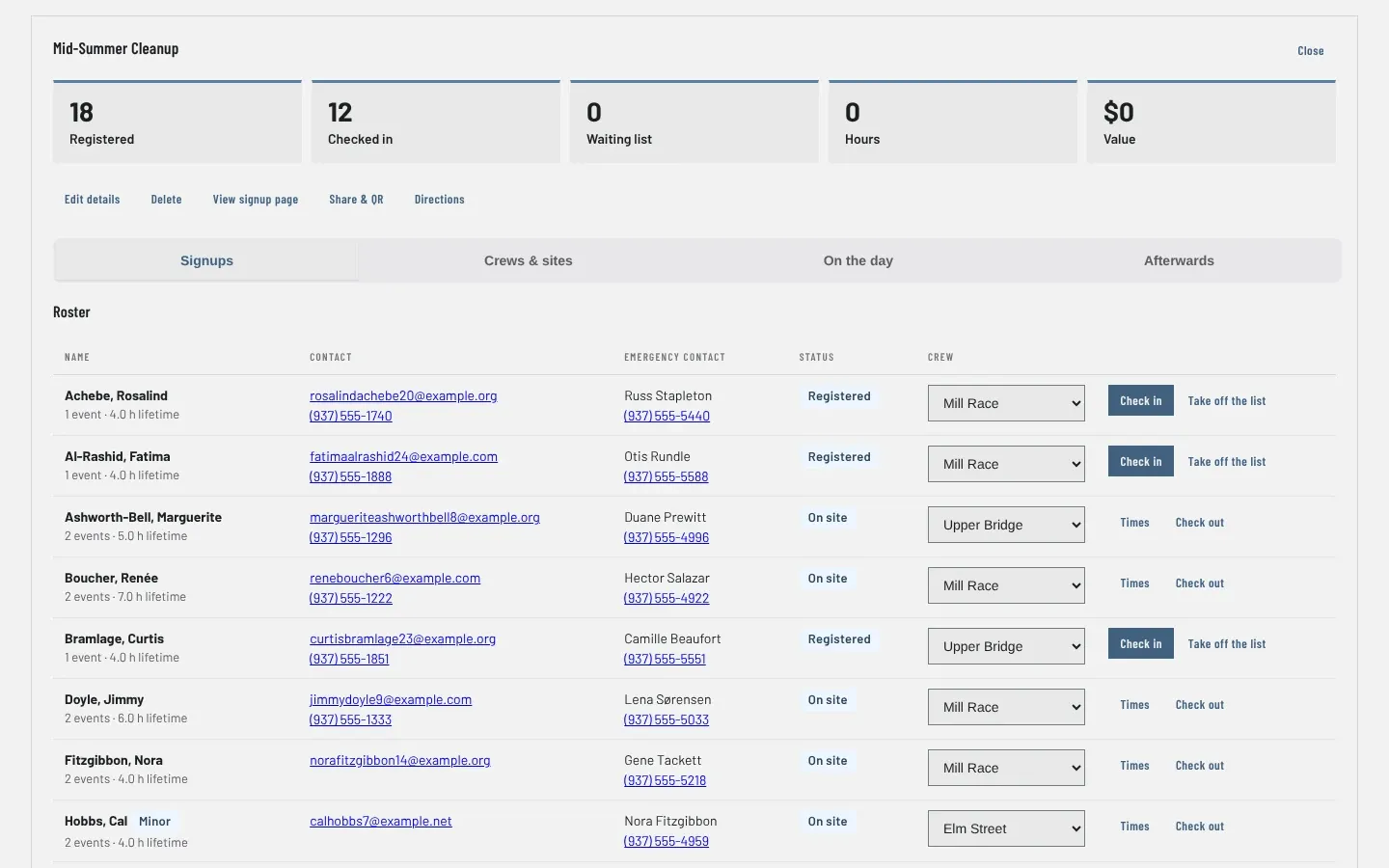
An event's roster, crews and check-in in one place -
Running the day from a phone, no login 
Running the day from a phone, no login -
One record per person, across every year 
One record per person, across every year -
Grant and board report, from the same hour ledger 
Grant and board report, from the same hour ledger -
The signup page each event gets automatically 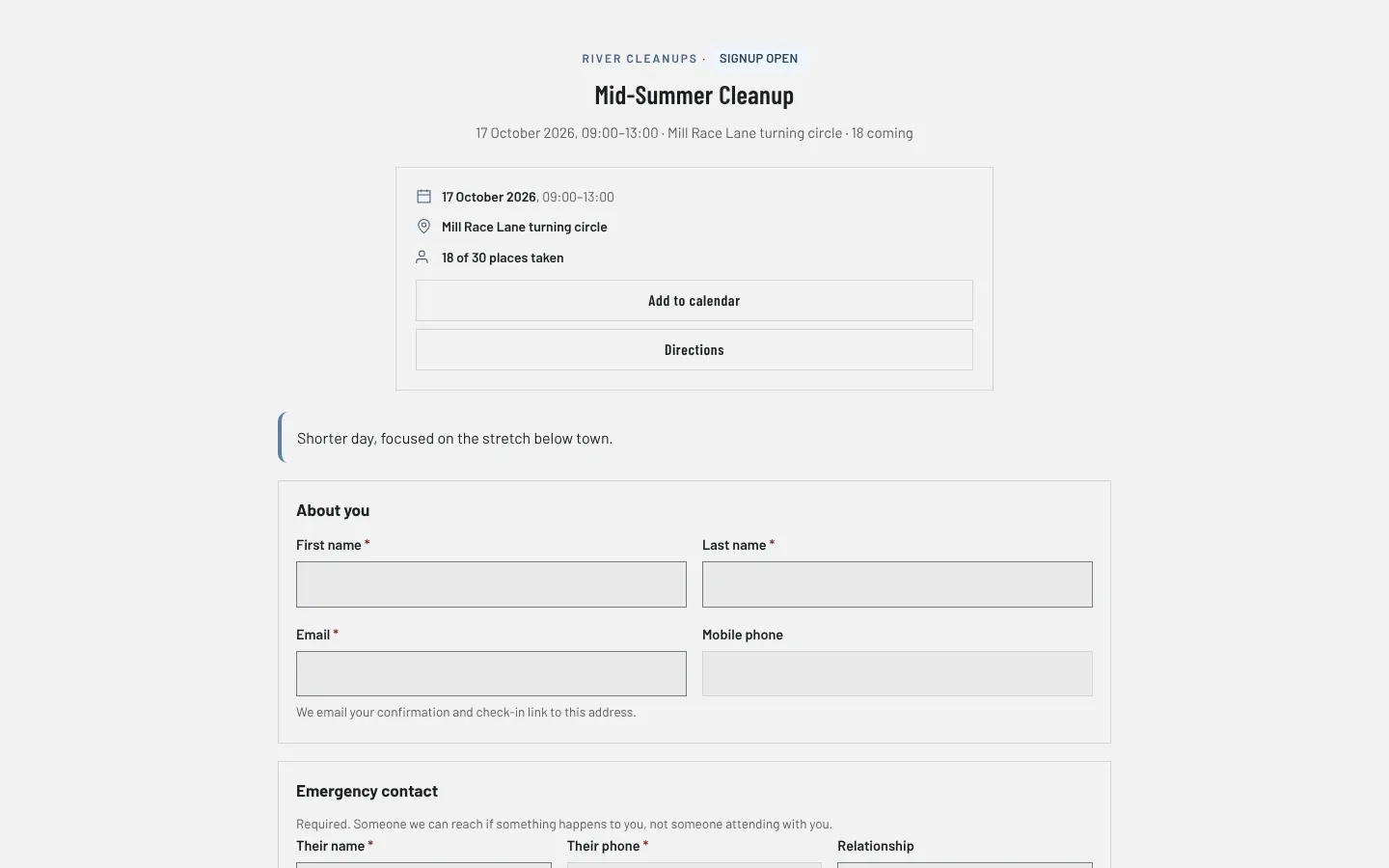
The signup page each event gets automatically
Headwaters is a volunteer management system (VMS) for a chapter-sized nonprofit or community organization: the people, the events, the hours and the reports, in one place. It grew up running river cleanups for a conservation chapter, and a river cleanup is one event type among several: a Saturday workday, stream monitoring, an education night and a board meeting all use the same signup, the same check-in and the same hour ledger, with only the parts that make sense for each.
Two ideas the rest is built on
A person is not a registration. One human, one record, however many times they show up. Their history, hours and consents follow that record, not the events.
A login is optional. Most people who ever touch the system will volunteer once. Requiring an account before a first signup loses a large share of them, so signup is passwordless: a signed personal link that also handles check-in and the hour log. Anyone who wants an account can claim one later, and nobody ends up with two identities.
Running the day without logging in
The people who run these events are volunteers standing in a parking lot at seven in the morning holding a phone. An administrator issues a coordinator link for one event: a page with the roster, one-tap check in and out, walk-up registration, and the results fields for that event type. No WordPress account, no password, and it stops working the day after the event. It keeps working with no signal, queuing taps with their real timestamps so hours reflect the morning rather than the moment reception came back.
Hours that survive an audit
Hours come from check-in and check-out, from volunteers’ own monthly reports, or from staff. Every entry records which. Self-reported hours wait for approval, every entry freezes the Independent Sector value that applied on its own date, and every change is written to an append-only log, so a report re-run in three years still reconciles with the one you filed.
Also in the box
Safety reporting with one-tap emergency and offline queuing. Partner organizations, sites that outlive events, teams with leaders who can be reached, photos that land unapproved. Equipment lists, announcements with read receipts, a planner that sizes crews against the real working window. CSV import from a spreadsheet full of years of volunteers, and CSV export of the things a treasurer and a grant officer actually want. Thirteen public-display switches whose defaults lean private, and full WordPress privacy integration.
WordPress or standalone
Headwaters runs two ways. As a WordPress plugin, installed through Plugins, Add New, it lives inside the website an organization already has. As a standalone application, it runs the same system on its own against PHP and MySQL, dropped onto a subdomain with no build step, for organizations whose website does not run WordPress. A migration tool moves a WordPress installation to standalone without touching the old database.
Documentation ships inside the plugin: a deployment guide, an admin guide, a front-desk guide for the day itself, and a volunteer guide written to be published on your own site. The tour, pricing and a demo request are on the Headwaters website (opens in a new tab).
Accessibility and standards
What Headwaters is built and checked against, in plain words. These are our own checks, not third-party certifications. About these standards.
- WCAG 2.1 AA
- The international accessibility checklist for the web, at the level most laws point to: readable contrast, keyboard operation, labels a screen reader can read, and no meaning carried by color alone.
- OWASP security review
- Checked against the OWASP list of the most common web application weaknesses, such as injection, broken access control and insecure defaults, before each release.
- WordPress Coding Standards
- The code is checked with the WordPress project’s own rules for security and compatibility: escaping output, verifying requests, and using WordPress functions rather than raw ones.
- WordPress privacy tools
- Plugs into WordPress’s built-in personal data export and erasure requests, the tools a site uses to answer a GDPR or CCPA request.
- iCalendar feeds
- Standard calendar subscriptions (the iCalendar format, RFC 5545) that work with Apple Calendar, Google Calendar and Outlook.
- Your data in open formats
- Exports come out as CSV, JSON, Markdown, PDF or RSS: files any spreadsheet, text editor or reader can open, with no need for our software.
- Works offline
- Every main task works in airplane mode after the first install. Nothing waits on a server to let you do your work.
Questions about Headwaters
Do volunteers have to make an account?
No, and by design most never will. Signup gives them a signed personal link that handles check-in and hour logging for years. Accounts exist for the people who want one.
Does Headwaters need WordPress?
No. Headwaters is a WordPress plugin, and it is also a standalone application that runs on its own against PHP and MySQL for organizations whose website does not use WordPress. The screens and the data are the same, and a migration tool moves a WordPress installation to standalone.
Can somebody run an event without logging in?
Yes. Open the event and choose the phone link for the coordinator. They get a URL and a QR code that works on any phone until the day after the event, with the roster, one-tap check-in, walk-up registration and the results fields.
What happens to our data if we remove the plugin?
Nothing. Uninstalling removes no data unless an administrator has explicitly turned that on. A decade of volunteer history should not disappear because somebody was troubleshooting.