Interview recorder
PromptCam
A testimonial and interview recorder for iPhone Duo. You film with the rear camera; the person on camera reads one question at a time on the outer display.
- On iPhone Duo, the outer display faces the person on camera and shows the current question, a countdown and a recording light
- You run everything from the inner display while filming with the rear camera
- One clip per question, named for the business, the person, the question and the take, so an editor can sort them unopened
- Built-in question sets for any business, dental and medical practices, home services, professional services, employee spotlights and events
- Write your own questions, or email the business a simple template and paste their reply back in
- Sessions are saved by business: reopen one to play the takes, save them to Photos or Files, or share them
- No account and no upload: footage stays on the phone until you export or share it
Coming soon. PromptCam is not released yet. This page is published early so its support and privacy information is available. Choose Notify me to get one email when it launches, and nothing else.
Screens
Select a screen to see it larger.
-
Every interview is saved by business, with its takes and running time. 
Every interview is saved by business, with its takes and running time. -
You film from the inner display; the person on camera reads the question on the outer one. 
You film from the inner display; the person on camera reads the question on the outer one. -
Keep the take and move on, or record that question again. 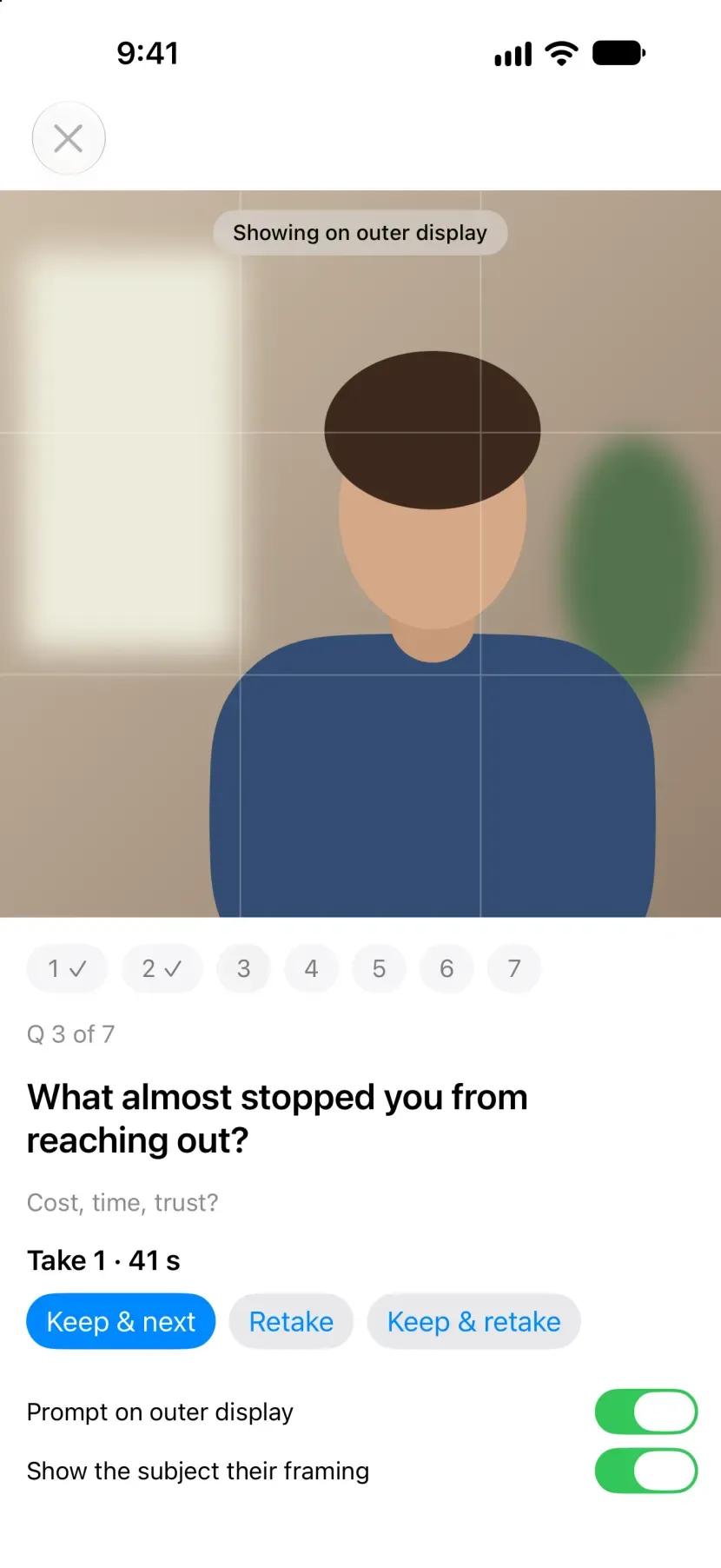
Keep the take and move on, or record that question again. -
One clip per question, named and ready to play or share. 
One clip per question, named and ready to play or share.
PromptCam is for filming a client, a patient or a customer saying something good about a business, without the usual trouble: the person on camera does not know what to say, looks at you instead of the lens, and you end up asking for another take while juggling a phone.
The question, under the lens
On iPhone Duo, opening the phone points the rear cameras and the outer display the same way. You hold the open phone and film from the inner display. The person you are filming sees the current question on the outer display in large type, a countdown before they start, and a clear sign that they are recording. The question also stays on your screen, and the outer display is treated as a bonus: if iOS takes it away, you read the question aloud and the session carries on.
One clip per question
Marketers edit by question, not by timeline, so every answer is saved as its own clip, named for the business, the person, the question and the take. Retakes are numbered. Every session is saved under its business, so you can come back to it later, play the takes, and save them to Photos or to a folder in Files, or share them.
Questions ready to go
PromptCam comes with question sets that follow the arc good testimonials share, from what was going on before to what changed after: a general set for any business, and sets for dental and medical practices, home services, professional services, employee spotlights and quick event interviews.
Or bring your own
Write your own questions in the app, or start from a built-in set and change it. When the business knows what it wants asked, send them a simple template by email or text. They write one question per numbered line, with an optional note for you and how long the answer should run, and reply. Paste their reply into PromptCam: it skips the greeting and the signature, points out questions that run long or ask two things at once, and saves the set for every session after.
Private by design
There is no account and no server. Footage stays in the app’s storage on your phone until you export or share it.
Pay once
Your first two sessions are free; a session counts once you keep a take. After that, PromptCam is a one-time $24.99 unlock, with no subscription.
PromptCam is in development for iPhone Duo and runs on other iPhones on iOS 27.1 or later.
Questions about PromptCam
What does the person on camera see?
On iPhone Duo, when the phone is open the rear cameras and the outer display face the same way. PromptCam shows the current question on the outer display in large type, then a countdown, then a recording light, so the person reads from just under the lens instead of looking at you.
Does it work on an iPhone that does not fold?
Yes. The same app runs on other iPhones. Without an outer display, the question shows on your screen and you read it aloud before each answer. iPhone Duo also falls back to this whenever the outer display is not available.
Can I use my own questions?
Yes. Write a set in the app, or copy a built-in one and change it. Or send the business a plain-text template by email: they write one question per numbered line and reply, and you paste the reply into PromptCam, which ignores the greeting and signature and shows you what it found before saving.
How are the clips named?
Each answer is its own clip, named for the business, the date, the person, the question number and a short form of the question, and the take. A file reads like smile-family-dental_20261103_maria_Q03_what-changed_T2.mov.
Where does the footage go?
It stays in PromptCam's own storage on your iPhone, left out of iPhone backups because video is large, until you move it. You can save the kept takes to Photos, save a folder of them to Files, or share them with AirDrop or another app. Nothing is uploaded to us; there is no PromptCam server.