iPhone app
VeraFlow
A private meeting recorder for iPhone. Transcripts with speaker names, summaries and action items, all made on your phone.
- Record a meeting, or import an audio file or the audio track of a video
- Transcription with Apple's on-device speech recognition, with search and editing
- Speaker labels, so you can see who said what
- Summaries with decisions, open questions, and action items with owners and due dates
- Send action items to Reminders, draft a follow-up email, or export PDF, Markdown or text
- Optional Face ID lock, crash-safe recording, and pause and resume from the Lock Screen
Coming soon. VeraFlow is not released yet. This page is published early so its support and privacy information is available. Choose Notify me to get one email when it launches, and nothing else.
Screens
Select a screen to see it larger.
-
Record on your iPhone, with Pause and Mark one tap away 
Record on your iPhone, with Pause and Mark one tap away -
Who said what, paragraph by paragraph 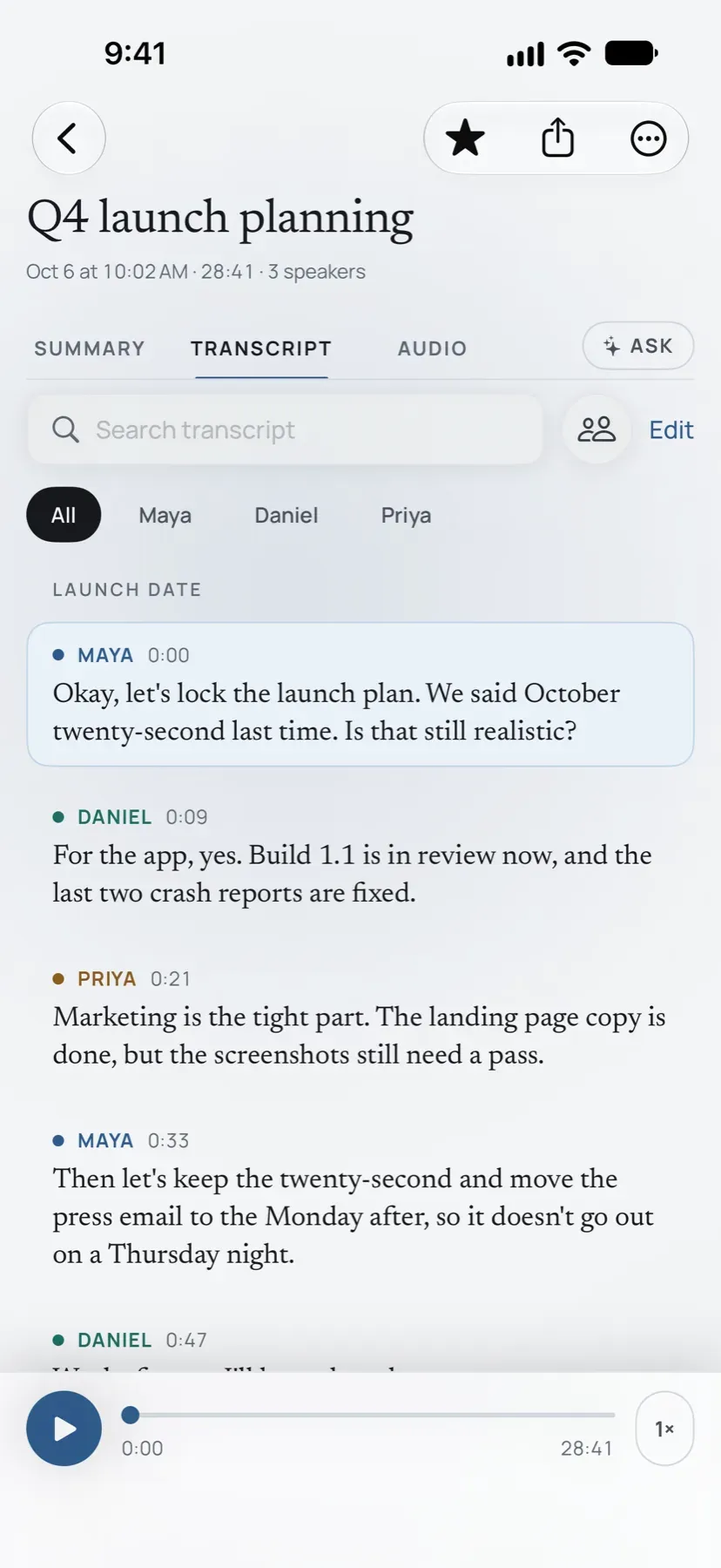
Who said what, paragraph by paragraph -
The summary: key points and the decisions the meeting made 
The summary: key points and the decisions the meeting made -
Action items with owners and dates, and the questions still open 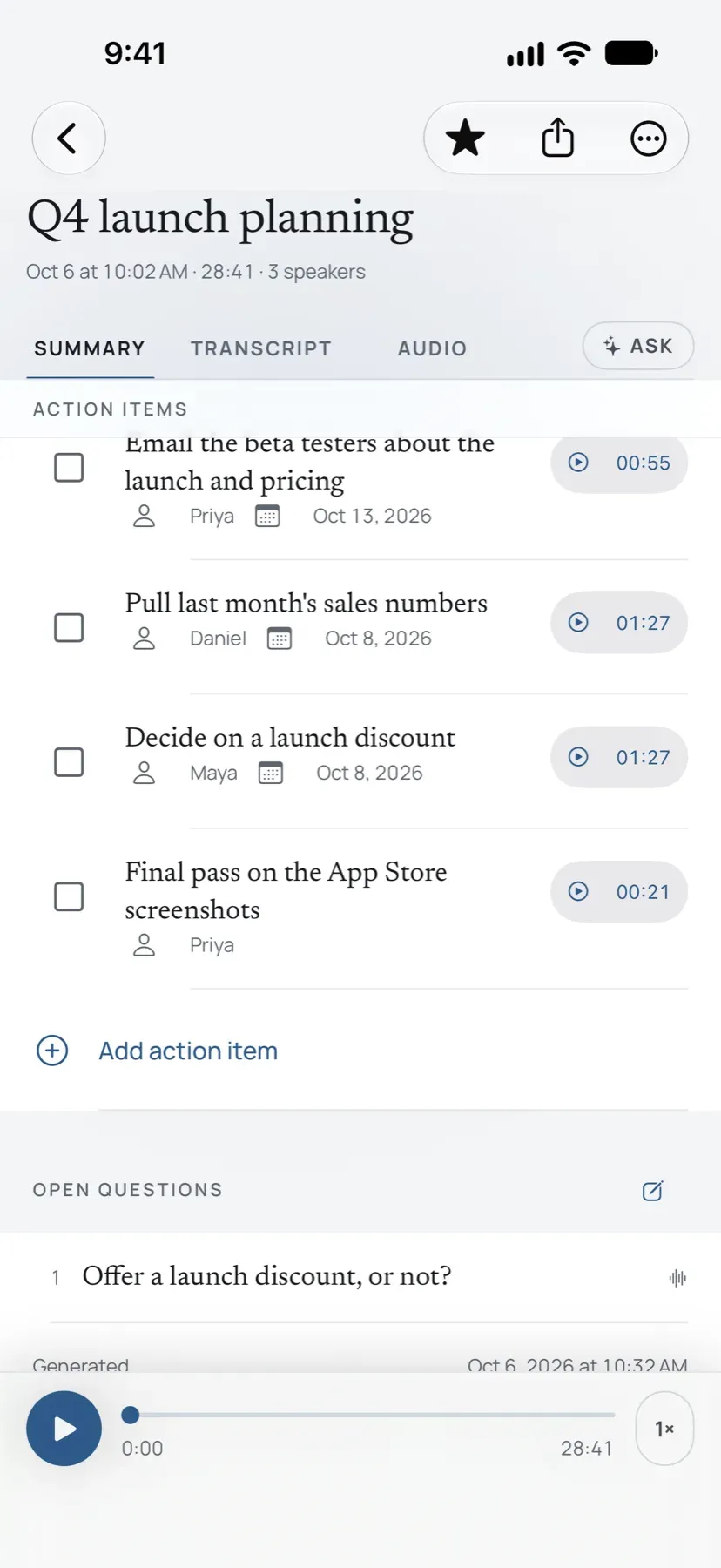
Action items with owners and dates, and the questions still open -
Every meeting in one library, with its summary at a glance 
Every meeting in one library, with its summary at a glance
VeraFlow turns a meeting into notes you can act on, and it does all of the work on your iPhone. Record a client meeting, a job-site walk-through, a lecture or a call on speaker. When you stop, VeraFlow transcribes the recording, labels who said what, and writes a summary with decisions, open questions and action items.
Nothing leaves your phone
There is no account to create and no server involved. Transcription uses Apple’s on-device speech recognition, speaker labels run on the device, and summaries use Apple Intelligence on the phone. If you turn on the app lock, your recordings sit behind Face ID. The privacy policy is short because there is nothing to disclose: VeraFlow collects no data.
Who it is for
VeraFlow is built for people who record a few meetings a week and want the notes without the cloud.
- Contractors. A walk-through becomes a punch list with the measurements you said, not ones the app invented.
- Consultants and freelancers. A client call becomes a follow-up email in a minute.
- Students and lecturers. A long recording becomes a searchable transcript with speakers labeled.
Free and unlocked
Recording, importing, transcripts with speaker labels, search and editing are free without limit, as is a plain-text copy of anything. The free tier includes three AI summaries to try the templates. A one-time unlock for $19.99 adds unlimited summaries with every template, PDF and Markdown exports, email drafts and Reminders with due dates. It supports Family Sharing, and there is no subscription.
Requirements
VeraFlow requires iOS 26. Transcripts and speaker labels work on every iPhone that runs iOS 26. AI summaries need an iPhone with Apple Intelligence turned on, and the app says so before you buy. Summaries are generated from your recording and can contain mistakes, so the app reminds you to check important details.
Need help? See the VeraFlow support page.
Accessibility and standards
What VeraFlow is built and checked against, in plain words. These are our own checks, not third-party certifications. About these standards.
- Dynamic Type and large text
- Text follows the size you set in iOS Settings, up to the largest accessibility sizes, and screens rearrange themselves instead of cutting words off.
- VoiceOver
- Apple’s screen reader can use the whole app: every control has a spoken name, screens read in a sensible order, and nothing is image-only.
- Works offline
- Every main task works in airplane mode after the first install. Nothing waits on a server to let you do your work.
- No data collection
- The app gathers nothing about you: no analytics, no advertising identifiers, no tracking, and no server of ours. Its App Store privacy label is Data Not Collected.